Dev 10/9 Testing · checked against screenshots, 13 October 2026
Dev testing 10/9 — what is fixed
I went through all 27 of Peter’s comments in the testing doc (C0–C26) and checked each one against two recordings. The first is a full-page screenshot of Project Information on a live Assets project, in edit mode. The second is a 13-second screen recording of a one-day Consumables project: Project Information, then the Room Builder, then the Scheduling Assistant, then Live Project. A comment is marked done only when the screen shows it.
- Comments
- 27C0–C26, Peter Stahl, 9 Oct
- Done on screen
- 16all of the comment shows
- Partly done
- 3one part still missing
- Not shown
- 7on screens the recordings don’t reach
Still open
16 of 27 done on screen, 1 open, 3 partly done, 7 not shown
- C9Ask whether any rooms or areas need to go first, in the morning or the afternoon. Missing on both forms.
- C24Assets Site Access & Logistics matches Consumables except for that same morning / afternoon question
- C2Show the facility’s address where States in scope used to be. States in scope is gone, but there is no address yet.
- C19Show a label capture hasn’t seen before below the four tag bins. The bins are there; this part can’t be seen.
Assets projectscreenshot · Project Information, edit mode, project in progress
An Assets project on day 15 of 21. The sections run Client & Timeline, Site Access & Logistics, Locations & Scope, Existing Asset Data, Systems & Intent, Delivery & Acceptance, and Reference Files. No field outside Client & Timeline is marked required.

Client & TimelineC21 · the roster fields are gone
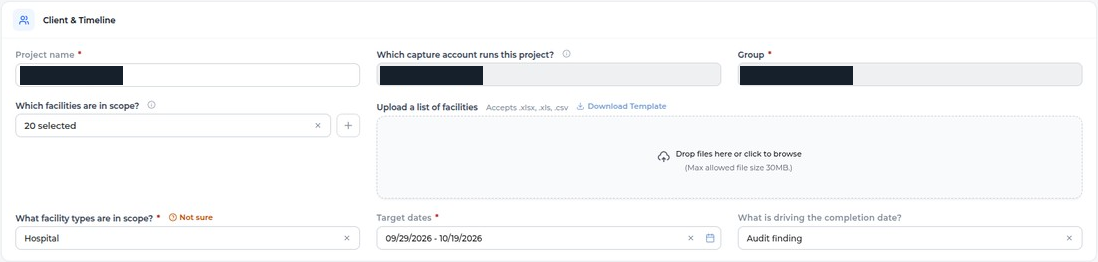
- C21“Upload a list of facilities” now sits to the right of “Which facilities are in scope?”.changedone
- C3There are no blackout dates on the Assets form.C3 asks for the same on Consumables. The recording shows that too (below), so C3 counts as done.removedone
The screenshot also shows the number of facilities, states in scope and the CMMS upload gone. That request was a separate comment in the 9 Oct copy, and it is not in today’s doc.
Site Access & LogisticsC8, C24 · now section 2
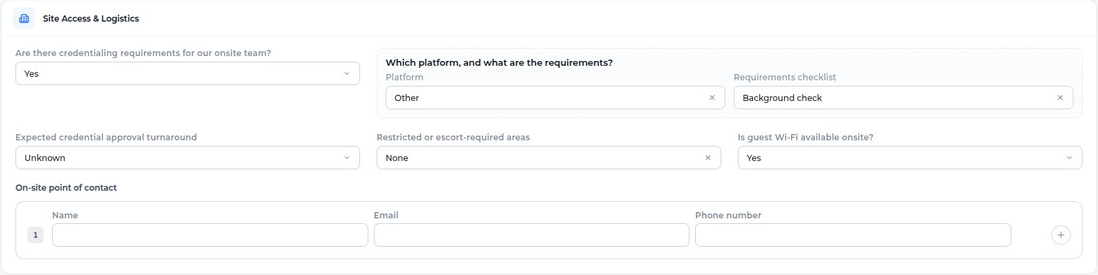
- C8Site Access & Logistics is now section 2, with no required fields. Floor plans, the source of truth for department naming, and site access hours are gone. “Who notifies clinical staff” is now On-site point of contact (Name, Email, Phone) with a + to add more contacts.The Consumables recording shows the same section.changedone
- C9Ask whether any rooms or areas need to go first, in the morning or the afternoon. On Yes, let them pick which.The section is in full view in this screenshot, and the question is not in it.add
- C24Move it up to section 2 and make the same changes as on the Consumables form.Everything from C8 is here. What is left is the morning / afternoon question (C9).change
Locations & ScopeC22
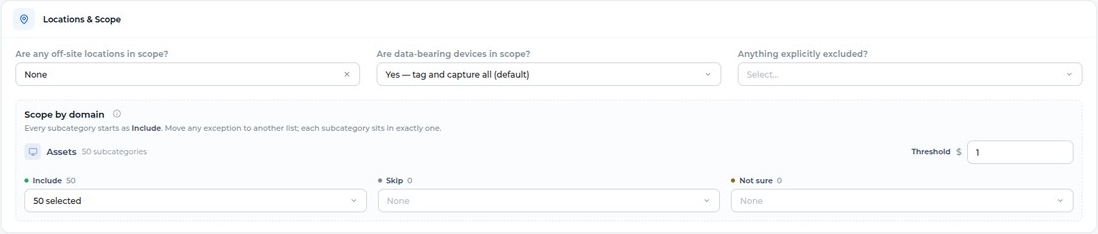
- C22The Project domain field is gone; the domain shows read-only in the header. Every field is optional, and the section is tighter, three fields to a row.removedone
Existing Asset DataC23

- C23“Do you have an existing asset list for us to reference?” and “How is the data organized?” are gone. Source system and export date, accuracy, and reconciliation are left, all optional.removedone
Systems & Intent, Delivery & AcceptanceC25, C26


- C25Every field in Systems & Intent is optional.changedone
- C26Contracted delivery SLA, “Who reviews and accepts the final deliverable”, and “How should data be transmitted / BAA or NDA” are gone. The fields left are optional.removedone
Reference filesC12, C18, C19
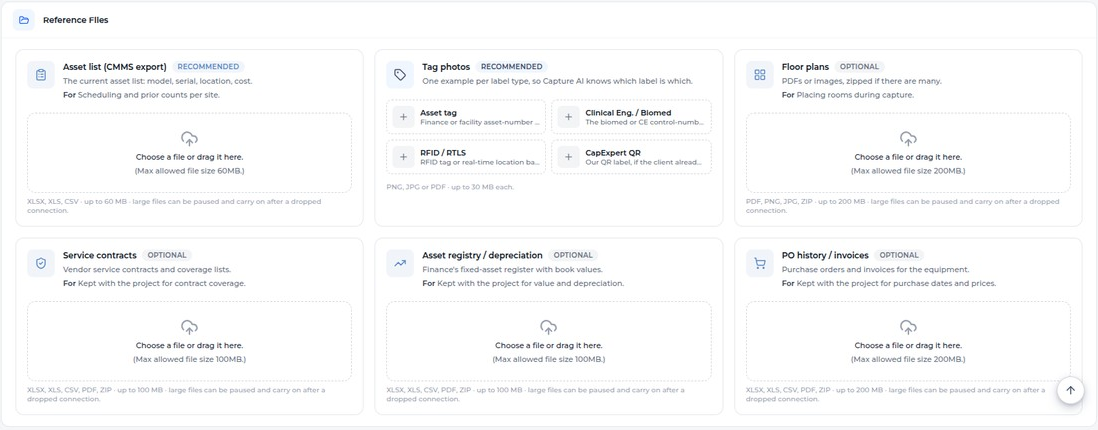
- C12The files from Start a Project now have their own section at the bottom of Project Information, where each one can be replaced.The Consumables recording lists Reference Files as its third section too.adddone
- C18There are new cards for Service contracts, Asset registry / depreciation and PO history / invoices.adddone
- C19Tag photos is split into four bins: Asset tag, Clinical Eng. / Biomed, RFID / RTLS and CapExpert QR.Not shown: a label capture hasn’t seen before, appearing below the bins to drag into one and running Ishita’s script. A screenshot can’t show this until such a label exists.change
AutosaveC1

- C1Project Information saves as you type: the footer reads All changes saved, and Save Changes stays greyed out because nothing is waiting to be saved.bugdone
Consumables projectscreen recording · a one-day project, End to End, 09/25
A one-day Consumables project at a single site. It ended 18 days ago and is still marked In Progress.
Project InformationC2–C7, C11 · three sections left
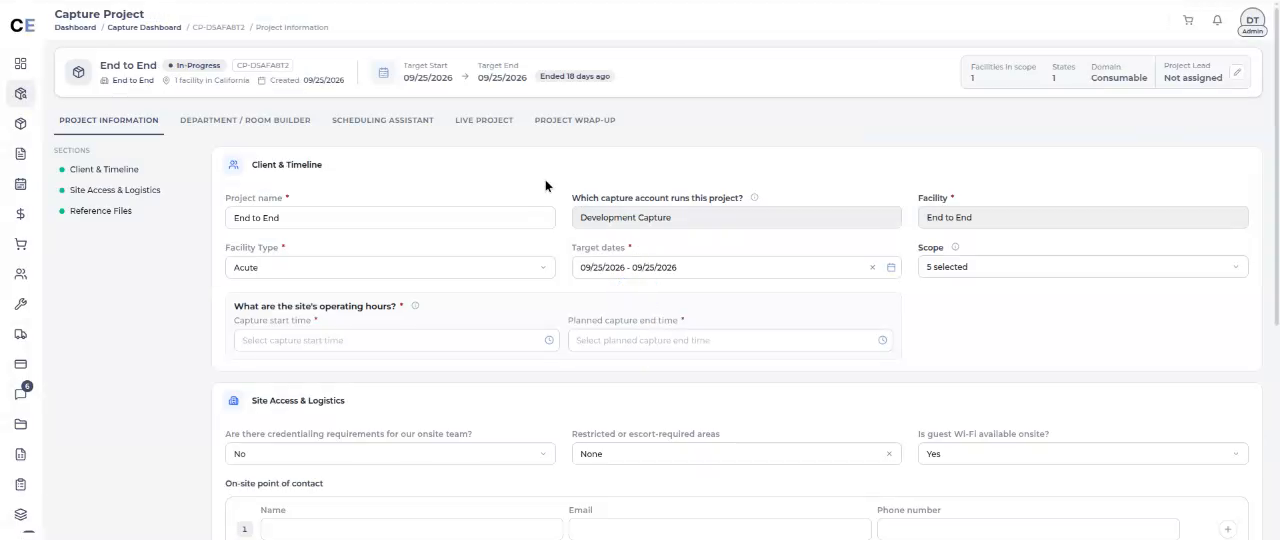
- C2Client & Timeline: the operating hours are now Capture start time and Planned capture end time, both required. Facility Type takes one choice, set to Acute. Number of facilities, states in scope, “What is driving the completion date?” and the CMMS upload are gone.Still missing: the facility’s address, shown where States in scope was (point 4 of the comment).change
- C3Blackout dates are gone from this form as well.removedone
- C4All four Locations & Scope fields are gone.removedone
- C5Subcategories are now one optional Scope field in section 1, which shows 5 selected, instead of the Include / Skip / Not sure lists.changedone
- C6Existing Asset Data is gone.removedone
- C7Capture Requirements is gone.removedone
- C11Systems & Intent and Delivery & Acceptance are gone. The Assets form keeps both, with every field optional (C25, C26).removedone
SchedulingC14 done · C15 can’t be judged on this project
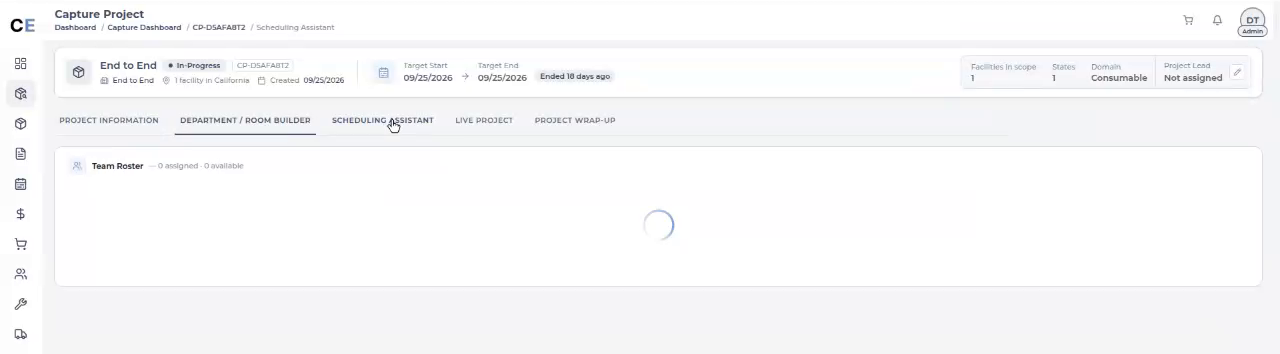
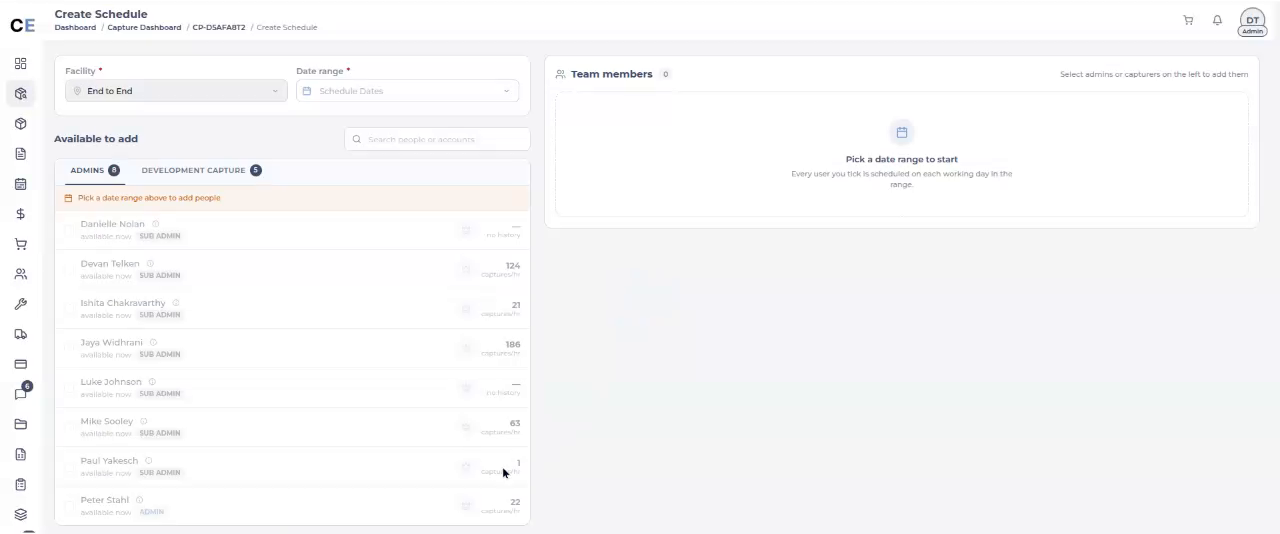
- C14A one-day, one-site project now goes straight from the Scheduling Assistant tab to Create Schedule. Nobody clicks Create Schedule.changedone
- C15The project’s only day should already be picked in the date range. In this recording the range is empty.That is expected for this project. The code (
seedOneDayRangeincapture-build-team.component.ts) skips a day that has already passed, and this project’s day was 09/25. Check it again on a one-day project dated today or later.retest
Not shownon screens the recordings don’t reach
These are still listed so the page covers all 27 comments. On the right is what the 13 October code check found, linked to its task on capexpert-tasks. These have not been checked on screen.
- C0Accept a zipped item master, the way PO history already does.Start a Project → Files, Consumables. Davinder T1done in code
- C10Guest Wi-Fi options: Yes, No, Unknown.The field shows Yes, but the dropdown is never opened, so the other options can’t be seen. Shoaib T16done in code
- C13What should Upload Rooms do with a second file, either a few more rooms or a completely different file?The recording opens the Room Builder but doesn’t upload anything. This needs an answer before it can be built. Rohit T1question
- C16Jaya’s agent will go in the Captain recommendation space.That space appears only after a date range is picked. Rohit T5note
- C17Under “Not available”, show where the person is already booked.With no dates picked, everyone reads “available now”. Rohit T6done in code
- C20Remove the “glitter pop” on the Project submitted modal.Neither recording submits a project. Davinder T2done in code
The seventh comment that isn’t shown is C15, under Scheduling above. Two things from the 9 Oct copy are no longer in today’s doc: the City / State fields for capture users, and the Assets comment about removing number of facilities, states, the CMMS upload and blackout dates. The screenshot shows that second one done anyway.